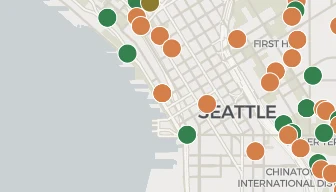
Building permits are public record in Seattle. Every construction project files one, and you can look up any of them. The question is which tool to use — the city runs three separate systems, and each one has gaps. This guide walks through all four options, from the city's own portals to BuildVue.
What Is a Building Permit?
SDCI (Seattle Department of Construction & Inspections) issues building permits to authorize construction, demolition, or renovation. Any project beyond minor repairs needs one, and every permit is public record.
Each permit includes:
Address and parcel information
Description of the proposed work
Status (application, in review, issued, final, expired)
Dates including application, issuance, and completion
Estimated construction value
Contractor and applicant information
Method 1: Seattle Services Portal (Accela)
The Seattle Services Portal is the city's official permit lookup system powered by Accela. You can search by address, permit number, or parcel number.
Pros: Official source, includes inspection records and document attachments.
Cons: Clunky interface, no map view, hard to browse by area or compare projects. One permit at a time, with no way to see everything at once.
Method 2: SDCI Records Research
SDCI maintains a document archive with scanned plans, approval letters, and historical permit records going back decades. Useful for researching a specific property's full history.
Best for: Looking up a specific property's permit and plan history.
Building Permits, which covers every building permit application since 1990
Land Use Permits, which covers master use permits including design review, conditional use, and shoreline permits
NEWSLETTER
Get a monthly newsletter with new features plus Seattle Metro construction activity. No spam.
You can filter, sort, and download the data in bulk. There's also an API (Socrata) for programmatic access.
Pros: Free, bulk access, downloadable, API available.
Cons: Raw data with no map, no project linking, and no images. Using the API takes some technical skill.
Method 4: BuildVue
BuildVue aggregates data from all the sources above into a single interactive map. It links related permits at the same address, classifies projects by type (multi-family, mixed-use, office, retail), and adds design drawing images, architect and developer information, and parcel data.
Key features:
Interactive map with project markers and filtering
Advanced filters by status, type, zoning, value, stories, units, and more
Neighborhood browsing to see all projects in Ballard, Capitol Hill, or any Seattle neighborhood
Saved searches with email alerts that notify you when new permits match your criteria
Design drawings with architectural renderings and site plans
Data export to download filtered results to CSV or Excel
Best for: Anyone monitoring construction activity across Seattle on an ongoing basis — developers, contractors, architects, and investors.
Understanding Permit Statuses
When tracking permits, you'll encounter these key statuses:
Status
What It Means
Application
Permit has been submitted but not yet reviewed
In Review
SDCI is reviewing the application
Approved/Issued
Permit approved and construction can begin
Under Inspection
Construction is underway, inspections being conducted
Final
All inspections passed, construction complete
Expired
Permit expired before construction was completed
Tips for Effective Permit Tracking
Search by address, not just permit number, because multiple permits often exist for the same property (demolition, new construction, mechanical, etc.)
Check both building and land use permits, since large projects have a land use/master use permit for zoning approval and separate building permits for construction
Read the description field — it has the best summary of what's being built
Set up alerts — email notifications beat checking the portal every morning
Cross-reference with design review, since projects in design review are 1-3 years from construction, giving you early visibility
Start Tracking
Open BuildVue's map, filter by your neighborhood, and save your search. You'll get email alerts when new permits match your criteria.
WHY BUILDVUE
See the projects behind this article
BuildVue tracks development permits across two dozen cities around Puget Sound. Every project in this article is on the live map with its full permit history.
What the paid plans include
▪Full project details. Contacts, sales history, what is inside the building, and the full permit record.
▪Alerts. Daily email alerts for followed projects and saved searches.
▪Portfolios. Every past and current project from each developer and architect.
▪Trends. Market statistics and neighborhood totals.
▪Exports. Any filtered list as a spreadsheet.
▪Assistant. Answers about the data in plain words.
Plans start at $29 a month. Every account begins with a free 14 day trial of Pro. No card needed.